MCP Security: How to Run MCP Servers Safely in the Enterprise

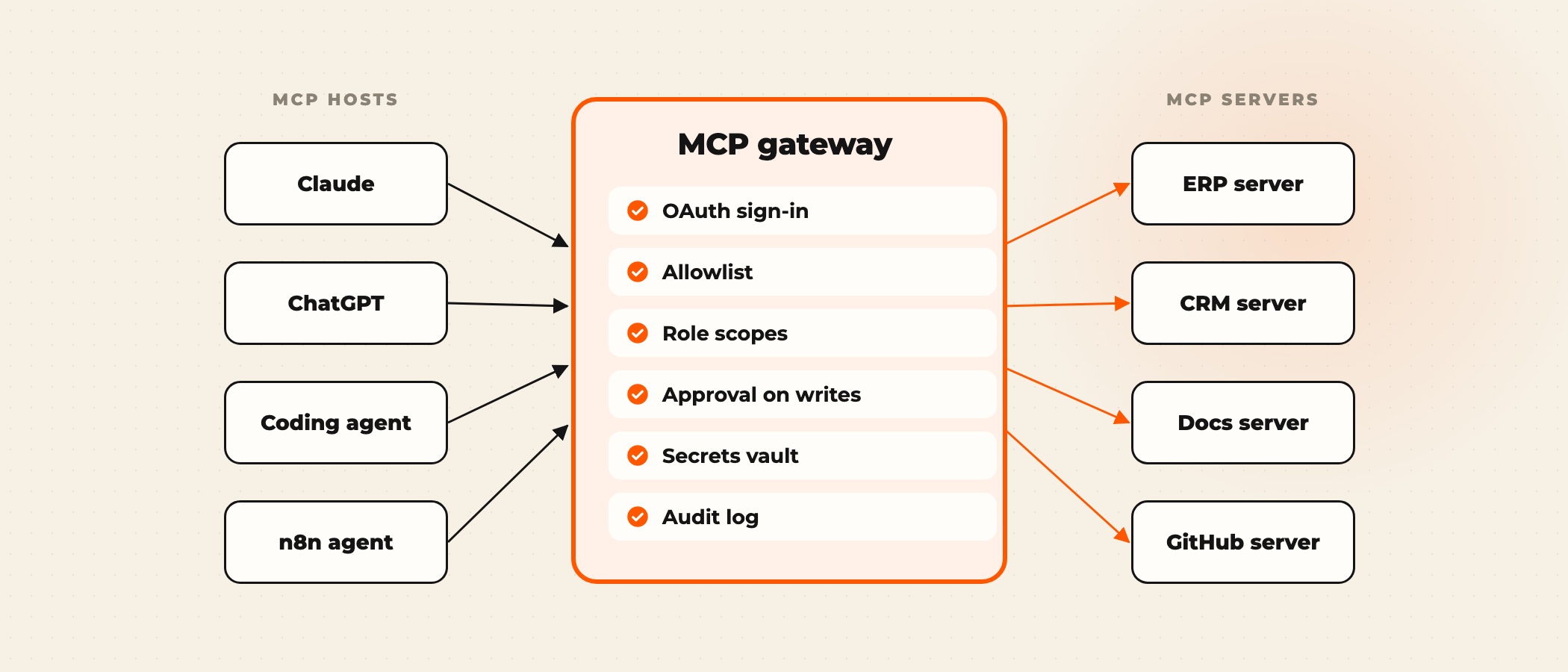
MCP security comes down to one fact: an MCP server lets a model take actions in a real system, so whoever can influence the model can try to take those actions too. A safe enterprise deployment runs every server on the signed-in user's own permissions, exposes only narrow tools, treats every tool description and tool result as untrusted text, makes writes and outside sends wait for a person, and logs every call. Most teams put those controls in one place, an MCP gateway that every host goes through.
None of this is hypothetical. In its first year MCP collected a public record of poisoned tools, leaked customer data and a malicious package, while the specification's authorization rules were tightened in successive revisions. If you are new to the protocol, start with our explainer on what an MCP server is.
Where MCP deployments have broken
Six public incidents between April and September 2025 cover most of the ways an MCP setup fails. Each one maps to a control you can put in place before launch.
| Incident | What happened | The control that stops it |
|---|---|---|
| Tool poisoning, Invariant Labs, April 2025 | Hidden instructions in a tool's description told the model to read private files and send them out through another tool | Review and pin tool descriptions; alert when a server changes them |
| GitHub MCP prompt injection, Invariant Labs, May 2025 | A crafted issue in a public repository led an agent to copy data from private repositories into a public pull request | One repository per session, least-privilege tokens, approval before writes |
| Asana MCP server, June 2025 | A flaw in Asana's new MCP server could expose one customer's data to other organisations; about 1,000 customers were notified | Tenant isolation tests on any hosted server before you connect it |
| MCP Inspector, CVE-2025-49596, June 2025 | A developer debugging tool listening on the local machine could be reached from a malicious web page and run commands | Patch developer tools; bind local servers to localhost with authentication |
| mcp-remote, CVE-2025-6514, July 2025 | A popular proxy package let a malicious server run commands on the client machine (CVSS 9.6, fixed in 0.1.16) | Pin and scan client-side packages like any other dependency |
| postmark-mcp, September 2025 | A copy of an email server on npm added a hidden blind copy of every email to the attacker from version 1.0.16 | Install servers only from an internal registry of reviewed versions |
Two patterns run through the list. The model obeyed text it should have treated as data, and a server ran with more access than its job needed. The OWASP Top 10 for Agentic Applications, published in December 2025, names both, as agent goal hijacking and tool misuse.
Decide which tool calls run on their own
The most useful policy decision is which calls an agent may make without a person. Write it down per tool before the server goes live. The check below applies the rule we use on builds: reads of public or internal data run and are logged, anything that writes, sends outside the company or touches customer or financial data waits for a named approver, and a shared key or an unreviewed package blocks the call outright.
The approval step does not have to be slow. On our builds it is a Teams or Slack message with the proposed action and two buttons, and the error rate on each tool decides when the approval can be lifted. Our enterprise AI governance page lists the ten controls that go around every agent we ship.
How MCP authorization works
The March 2025 revision of the specification added an authorization framework based on OAuth 2.1. The June 2025 revision made it stricter: a protected MCP server acts as an OAuth resource server, publishes protected resource metadata (RFC 9728) so clients can find the right authorization server, and clients must use resource indicators (RFC 8707) so a token is issued for one specific server. The July 2026 revision deprecated dynamic client registration in favour of client ID metadata documents.
For an enterprise, four rules follow from the specification and its security best practices.
- Users sign in through your identity provider. The MCP server accepts tokens your provider issued for that server, and nothing else.
- No token passthrough. The specification explicitly forbids a server from accepting a token meant for something else and passing it on. A server that calls the ERP gets its own token for the ERP.
- Scopes follow the user. The agent can do what the signed-in user can do, and less if the tool is narrower. A shared service key with admin rights breaks the audit trail, because every call looks the same.
- Authorization is optional in the specification, not in your company. Any server reachable over the network requires a token, including internal ones.
NIST's National Cybersecurity Center of Excellence reached the same point in a February 2026 concept paper on software and AI agent identity, which notes that MCP relies on OAuth and OpenID Connect for rights delegation and authentication, and plans to apply NIST's zero trust architecture guidance (SP 800-207) to agents.
What an MCP gateway does
An MCP gateway is a proxy between your MCP hosts and your MCP servers. It is not part of the specification; it is the place a company puts the controls above so they are not rebuilt in every server. Hosts connect only to the gateway, and the gateway decides which servers and tools each user can reach.
| Gateway function | Why it matters |
|---|---|
| Single sign-on and token checks | Every call carries a user identity your identity provider issued |
| Allowlist of servers and tools | A new server, or a changed tool description, cannot appear without review |
| Scopes per role | Finance reaches the ERP tools, support reaches the helpdesk tools |
| Approval on writes | One approval flow for every server instead of one per build |
| Secrets management | System credentials stay in the gateway or a vault, never in the agent's context |
| Logging and rate limits | One audit log of who called which tool with what arguments, and a ceiling on runaway agents |
Commercial gateways exist, and so do open-source ones. For a smaller estate, an n8n instance can play the same role: workflows behind an MCP Server Trigger become the only tools agents see, each with its own credentials, approval step and execution log. Our n8n Enterprise page covers the self-hosted setup this needs.
Supply chain: treat MCP servers like dependencies
Public MCP servers are code from strangers that runs with your credentials. The postmark-mcp package worked as advertised until version 1.0.16 added the hidden copy. Keep an internal list of approved servers pinned to reviewed versions, scan them like any other package, and re-review on every upgrade. The official MCP Registry, in preview since September 2025, is a directory of what exists, not a security review.
A rollout checklist for enterprise MCP
- Inventory every MCP server in use, including ones developers installed locally.
- Put a gateway, or a single n8n instance, between hosts and servers.
- Connect it to your identity provider and reject any call without a user token.
- Expose narrow tools; split read and write tools so they can have different rules.
- Write the approval rule for each write, send and delete tool before go-live.
- Pin servers and tool descriptions to reviewed versions and alert on changes.
- Keep system credentials in a vault; the model never sees them.
- Log every call with user, tool, arguments and result, and have someone read the log.
- Run hostile test prompts, including injected instructions inside documents and tool results, before launch.
The same thinking applies to people. Our post on AI safety training for enterprise teams covers what builders and business users need to know to spot these failures.
Frequently asked questions
Is MCP secure?
The protocol defines OAuth 2.1 authorization and publishes security best practices, but authorization is optional in the specification and the protocol cannot stop a model from obeying malicious text. Security depends on how servers are built and deployed: user-scoped tokens, narrow tools, approval on writes, reviewed servers and logging.
What is an MCP gateway?
A proxy between MCP hosts and MCP servers that centralises sign-in, the allowlist of servers and tools, role scopes, approvals, secrets and logging. It is not part of the MCP specification; it is a deployment pattern companies use so each server does not rebuild those controls.
How does MCP authentication work?
A protected MCP server acts as an OAuth 2.1 resource server. The client discovers the authorization server from the server's protected resource metadata, the user signs in, and the client presents a token issued for that specific server. Servers must not pass tokens through to other services.
What is tool poisoning in MCP?
Hiding instructions in a tool's name, description or output so the model follows them, for example to read files and send them elsewhere. The defence is to treat descriptions and results as untrusted, review and pin tool definitions, and limit what any tool can do without approval.
Can we use public MCP servers in production?
Only after review. Pin a reviewed version in an internal registry, run it on least-privilege credentials, and re-review every upgrade. The postmark-mcp case showed that a package can turn malicious in a later release.
Ovidius builds MCP servers and agent workflows inside your systems, with sign-in, approvals and logs in place before anything goes live. To review an MCP setup you already run or plan a new one, book a discovery call.