AI Safety Training for Enterprise Teams: What Each Role Needs

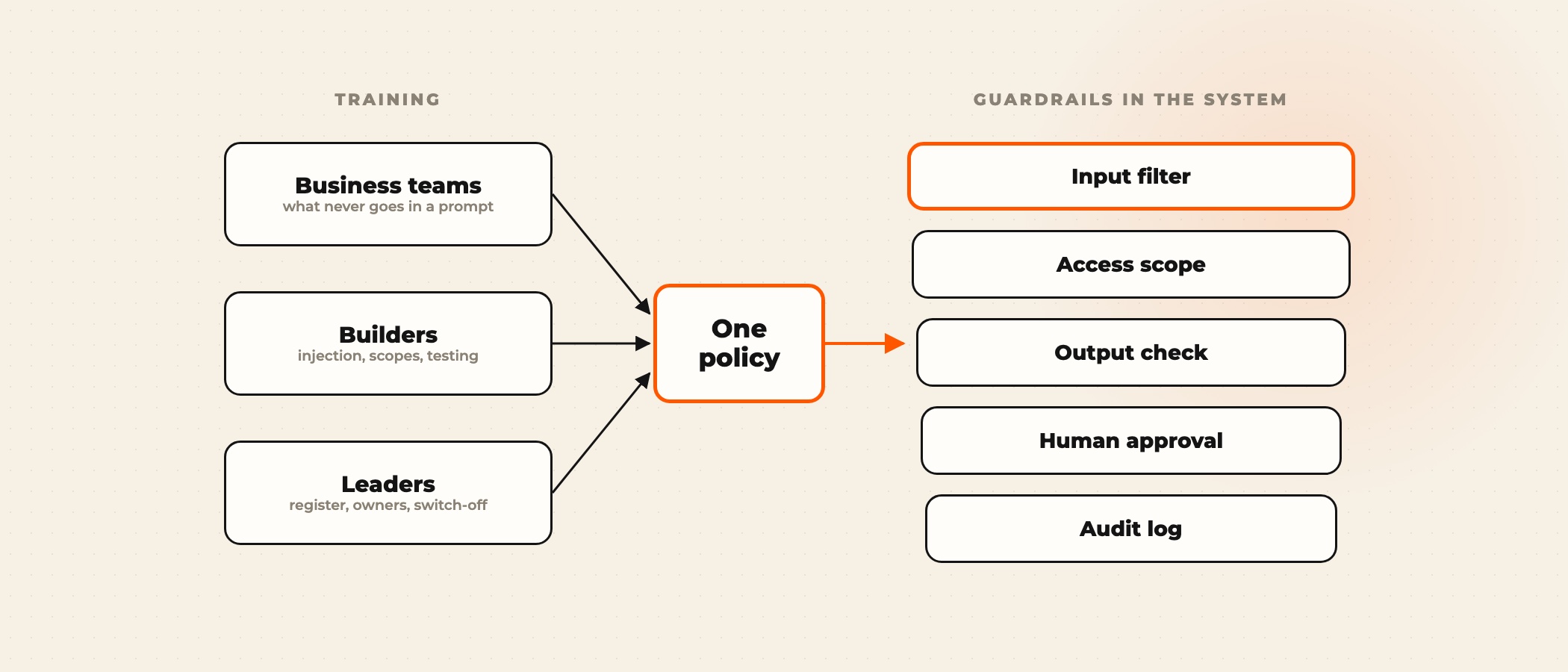
AI safety training teaches each person who uses or builds AI what can go wrong and what to do about it: business teams learn what never goes into a prompt and how to check an output, builders learn to defend against prompt injection and over-broad agents, and leaders learn to own the register of AI systems and the rules for switching one off. It works when it rests on one written policy, and when the systems themselves enforce the rules nobody can be trusted to remember on a deadline.
The gap is measurable. In McKinsey's State of AI in early 2024 survey of 1,363 participants, 44% said their organisation had already experienced at least one negative consequence from generative AI, with inaccuracy reported most often. IBM's Cost of a Data Breach Report 2025 found that 13% of organisations had a breach of an AI model or application, and 97% of those had no AI access controls in place.
Why IT security training does not cover AI
Standard security training teaches people to keep attackers out: spot the phishing email, lock the laptop, use the password manager. AI risk mostly comes from people who are allowed in. An employee with every right to read a customer contract can still paste it into a public chatbot, and an agent with valid credentials can still be talked into misusing them by a sentence hidden in a document.
The behaviour is already widespread. Cisco's 2024 Data Privacy Benchmark found that 48% of the 2,600 privacy and security professionals surveyed admitted entering non-public company information into generative AI tools. In the 2024 Microsoft and LinkedIn Work Trend Index, 75% of knowledge workers used AI at work and 78% of those users brought their own tools.
One policy, three audiences
A single course for everyone satisfies nobody. Engineers sit through prompt hygiene they already know, and business users meet red-teaming terms with no context. Split the training by what each group does with AI, and keep one policy underneath all three, so the rules a builder enforces in code are the same rules a sales rep learns.
Start from a written policy before the first session. Our AI use policy template covers approved tools, data classes, review rules and incident reporting, and gives each track its source material. For the broader skills side, such as using AI well rather than safely, our AI training for employees runs separate tracks for staff and executives.
Map the training to the NIST AI Risk Management Framework
NIST released the AI Risk Management Framework (AI RMF 1.0) on January 26, 2023, and a Generative AI Profile, NIST AI 600-1, on July 26, 2024. The framework is voluntary and is being revised under the White House AI Action Plan, but its four functions give a training program a structure that auditors, insurers and enterprise customers recognise.
| NIST AI RMF function | What it asks for | Where training covers it |
|---|---|---|
| Govern | Policies, roles and accountability for AI risk | Leaders track: the register, owners and approval rules |
| Map | The context, uses and possible harms of each AI system | Leaders and builders: what each system touches and who is affected |
| Measure | Testing and tracking of AI risks, before and after launch | Builders track: hostile test sets, logs and error rates |
| Manage | Responding to risks, including incidents and switch-off | All tracks: one reporting route, one person who decides |
The enterprise AI governance page sets out the ten controls Ovidius puts in place on a build, from approvals to audit logs, which gives the leaders track something concrete to own.
AI security training for builders: the OWASP lists
For the people who build with AI, the OWASP Top 10 for LLM Applications 2025 is the best single syllabus. It runs from prompt injection (LLM01) to unbounded consumption (LLM10). In December 2025 OWASP added a Top 10 for Agentic Applications, which covers agent goal hijacking, tool misuse and identity and privilege abuse. The five entries below cause most of the incidents we see in agent builds.
| OWASP entry | What it looks like | What builders learn to do |
|---|---|---|
| LLM01 Prompt injection | Instructions hidden in an email, web page or tool result change what the model does | Treat every retrieved text as untrusted, and limit what the agent can do with it |
| LLM02 Sensitive information disclosure | The model repeats customer data or secrets it was given or can reach | Filter inputs, scope retrieval to the user and redact before logging |
| LLM05 Improper output handling | Model output goes straight into a database query, a script or an email | Validate and escape output like any other user input |
| LLM06 Excessive agency | An agent holds write or send permissions its task does not need | Give each tool the narrowest scope and run it on the user's own credentials |
| LLM03 Supply chain | An unreviewed model, package or plugin enters production | Pin reviewed versions and keep an inventory of every component |
Agents that connect to company systems through the Model Context Protocol add a layer of their own. Our guide to MCP security covers tool poisoning, token handling and MCP gateways.
Shadow AI: why people go around the rules
Shadow AI is the use of AI tools the company has not approved, usually through personal accounts. IBM's 2025 breach report found that one in five organisations had a breach involving shadow AI, and that those breaches cost $670,000 more on average. Banning tools rarely ends it: people reach for a personal account when the approved tool is slower, weaker or harder to get to.
Training helps by explaining what the risk is, but the durable fix is an approved tool that is at least as good, with company data protection, sign-in and logging built in. Ask teams which tools they already use and why. The answers tell you what the approved tool has to do.
The guardrails training cannot replace
Trained people still make mistakes under pressure, and some failures never reach a person at all. A hidden instruction in a supplier email is invisible to the employee whose agent reads it. Build the controls into the system so that each failure has a layer designed to catch it. Pick a failure below to see which one does.
On the Pinkcube after-hours chat agent, a second AI agent audits every draft reply before the customer sees it, and the system went through 76 hostile test scenarios before launch. The full build is on the Pinkcube case.
Running the program after launch
- Write the policy first and publish it where people work, not in a shared drive.
- Run the three tracks in the same month, so leaders and builders hear the same rules as everyone else.
- Name an AI safety contact in each business unit who takes reports and knows who decides.
- Keep the register of AI systems current, with an owner and a scope for each one.
- Refresh the training when the tools change or after any incident, using the incident as the example.
- Measure reports filed, approved-tool usage and incidents per quarter, and share the numbers.
The AI readiness scorecard includes governance questions that work as a quick baseline before the first session.
Frequently asked questions
What should AI safety training for employees cover?
Which tools are approved, which data never goes into a prompt, how to check an output before acting on it and how to report a problem. Builders add prompt injection, agent permissions, output handling and testing. Leaders add the register of AI systems, approval rules and incident response.
What is the difference between AI safety training and AI security training?
AI security training is the builders' part: defending systems against attacks such as prompt injection, data leaks and supply chain compromise, usually following the OWASP lists. AI safety training is wider and covers everyone, including safe everyday use, checking outputs and governance.
Is general employee training needed if we already run security awareness training?
Yes. Security awareness training is about keeping outsiders out. Most AI incidents start with people and agents who are allowed in, such as an employee pasting a contract into a public tool or an agent following an instruction hidden in a document.
How does the NIST AI RMF apply to a commercial company?
It is voluntary, but its four functions, Govern, Map, Measure and Manage, give a program a structure that customers, auditors and insurers recognise. Training covers parts of each function, from the leaders who own the register to the builders who test before launch.
How do we stop shadow AI?
Offer an approved tool that is at least as useful as what people use privately, with company data protection, sign-in and logging, then explain the risk in training. Bans on their own tend to push use onto personal phones, where no company control reaches.
How often should AI safety training be repeated?
Refresh it when the approved tools change, when a new kind of AI system goes live and after any incident. A short quarterly update that uses real reports as examples keeps it current better than an annual course.
If you are rolling out AI tools or agents and want the training and the guardrails designed together, book a discovery call. We will ask what you are deploying, who uses it and what it can touch.